So, I've been a user of Gentoo or Arch/Artix for a long time now. I like being able to control exactly what is installed on my system, and I have learned a whole lot about how software is configured and how to build a Linux system from nearly nothing after using them. I can wholeheartedly recommend that most people who are serious about learning Linux systems should go through an Arch, Gentoo, or Linux From Scratch traditional installation at least once in their lives, to see the whole stack of software on a modern Linux system from the kernel up to the user programs and the minimum configuration needed for each tool to have a functional system.
The thing about actually using Arch or Gentoo day to day, though, is that if you use bloated or just plain complex software a lot of the time (think Steam, LibreOffice, Discord, Kdenlive, ...), these don't seem to be as thoroughly tested or have as deep of documentation on these systems as the corresponding simpler tools. Moreover, using Gentoo or Arch or the like means that you're setting everything up manually yourself, which tends to lead to the bigger, more complex software being much more involved of a process to get installed just by the nature of their dependency structure, compile times, or extensive required configuration. This means that most people that use the do-it-yourself distributions are naturally led to using tiling window managers like dwm, i3, or sway for their primary use of the computer instead of desktop environments like GNOME or KDE just because using a full desktop environment takes a significant amount of effort to set up and maintain.
And that's usually fine: if you want to use dwm or sway and you're fully ready to switch to a tiling window manager workflow, you're going to have a great time, but within some bounds of what you try to do with it. As much as I personally love tiling window managers, tiling isn't the most supported way to use most programs, and if you're trying to run Steam or otherwise run Windows software through a compatibility layer the tiling can cause bugs with the software. Some bugs I've seen are rendering to only part of the window, crashing, buttons not being visually aligned to where they're drawn, etc. This isn't actually a problem with the tiling window manager itself, necessarily, but with the software itself, but it's just been the standard ever since Windows 1.0 to target floating and I don't think that will ever change. So unfortunately, a lot of software just won't be tested against tiling window managers or won't target that workflow at all in development. This all means that with Gentoo and Arch, if you follow the train of reasoning of wanting to simplify your system, you're railroaded into a tiling window manager that won't have the best compatibility with some software.
I had my primary Gentoo system for a long time be my MSI Raider gaming laptop, with the goal of reaching the highest compatibility with software possible. I wanted to basically be able to run anything that I needed to with the best performance possible. A big reason behind using Gentoo for this is that if you're on a functioning, updateable Gentoo system, then you absolutely MUST by necessity have a working, stable, and fairly up to date build system and toolchain. This isn't the case on other distros that don't ship by default with a copy of gcc or even things like vim, make, rsync, and git. This means that on Gentoo, if you need to build some third party software from Codeberg that's not in the Gentoo repositories, you are sitting in your default PATH on an excellent toolchain to build anything that's thrown at you, ready to go, no matter what.
Because of the aforementioned issues with using a tiling window manager, I ended up having to try and get KDE working on the Gentoo system to fix some of the issues with just day to day usage of specific software, specifically some old games like Total Annihilation I was trying to get working through Wine. According to the Gentoo wiki, Gentoo has "excellent support" for KDE, so I did my best to get it working. It did ultimately work for about 6 months, and during that time it was pretty fantastic. Most of the integrations worked so well that it gave me a better interface to do stuff like connect bluetooth or change audio levels than I ever had access to before, which was the best part for me after switch to a desktop environment day to day. However I ran into a lot of issues with the Nvidia graphics in that laptop interfacing with KDE that I always had to do some workaround for (never buy Nvidia products, I'm just stuck with them), and eventually, an update failed to compile in the middle of building the desktop which broke my desktop completely. I was stuck with a half-built broken desktop for awhile, and I didn't really have any recourse to fix it because I had to wait for a new patch to fix the bug and the old version was no longer in the repositories. Basically, I just had to wait for it to be fixed, having my "highest compatibility" machine not even having a functional GUI. That pissed me off pretty badly.
As someone that wants to get a job as a sysadmin eventually, I'm fairly well versed in Red Hat-isms, so Fedora's always been at the back of my mind. I didn't want to use it previously though because I can't stand using new versions of GNOME which comes standard on Red Hat's operating systems, and I just find GNOME's whole philosophy on the desktop misguided and controlling. But not that long ago Fedora started offering KDE as a flagship workstation version of the operating system right next to their GNOME version, so I hopped on board and gave it a try. I tried it out for awhile when it first came out about two years ago, then went back to Gentoo after having some incompatibility with the Nvidia graphics I was running the system on, then kind of forgot about it for awhile.
In October of last year, I had a Linux install party with my fiance the day that Microsoft ended support for Windows 10. I needed an operating system to set up on my fiance's fairly legacy computer that wouldn't have supported Windows 11 anyways (it was a Dell Optiplex from the same era as the Thinkpad T420 that I was using day to day at the time), and I wanted to provide them with an operating system with fairly new driver updates and support but also not ultra resource intensive, and so I gave Fedora KDE a shot. It worked surprisingly well on this really slow hardware, and after seeing how it performed, I started installing it on more systems: first my fiance's upgrade computer they received a few months after I installed Fedora on the first one, then I put Fedora on my Nvidia main laptop, and finally I put it on my Thinkpad T420, my last system still using the classic Gentoo and Sway tiling window manager workflow. Now, Fedora's even running the backend for vps1, the server you're (most likely) reading this on.
So far it's been great. It is really the best experience I've ever had with a "just works" distro. In my past experience when I use the distros that are supposed to, again, "just work", I get all kinds of bad behavior or unmodifiable crap. For example, with Debian based systems like Ubuntu or Linux Mint, I install a LOT of software on my computers that I set up and eventually a package installation somewhere breaks something, causing a horrible bug. Fedora is pretty good about managing configuration files, with a system similar to the .pacnew files generated by pacman on Arch. DNF, the system package manager, won't replace configuration files, but instead will just put a file with an extension in the same location that you can manually copy over or copy individual changes from when you need them. I feel totally free to install anything on Fedora and it's going to work 99% of the time out of the box, with everything set up fairly default so documentation is easy to find, and with any new configuration being easy to add. The compiler toolchain for LLVM, Rust, and GCC is also super up to date on Fedora (some would say straight up bleeding edge), so there's rarely any compatibility problems building software from the internet you find on Codeberg or whatnot.
In my opinion, the main thing about Red Hat operating systems that makes them unique is their integration of SELinux with every install. This makes your system have effectively a second permission system from the default Unix permissions that adds a layer of security, so that certain applications can only access certain types of files. It's not super clear how to use it to me and there's a lot of things I don't know, and I think it could use with some more documentation or something like the Rust book, but basically any task you're trying to do on a Fedora system you can find a guide for that specific task anyways which will include fixes for the SELinux permissions. On the desktop this is usually not too big an issue because things are configured correctly after installation for most desktop software, but it's pretty annoying to deal with on servers in particular, where you need to have both your Unix and SELinux permissions set up correctly for anything you're hosting to the web. For this reason I wouldn't recommend hosting Fedora on a server if you haven't used it before and haven't had to work with SELinux policies previously. But, this is a static site, so the SELinux stuff isn't too bad to deal with and I have it all scripted out to be done automatically now on site updating. On the plus side, Fedora with SELinux hasn't been vulnerable to any of the recently discovered Linux vulnerabilities since SELinux effectively stops them from working regardless of kernel version, and Fedora gets very current kernel versions patching these issues out as soon as possible anyways, whereas systems that are slower and don't use SELinux like Debian can be straight up vulnerable for awhile before fixes or mitigations are backported. It seems that Fedora right now is the security leader in its handling of these kind of vulnerabilities.
Now that I've used Fedora on all these systems for about a year now, I can say it's been really smooth. I know where to look and generally what to do if there's permission issues now, and they rarely come up anyways outside of my server, which is good. After so many installs I have it down to a science now where I can get a full Fedora system with all my favorite software installed within a day, where the real limiting factor is just my trash internet at home, not actually any real configuring work on the operating system side. I have a git repository of dot files I pass around between computers and it's as simple as just copying the desired files into the correct places to get a new system up and running. (If you're wondering, my dot files are not public because I keep personal stuff in there and modified versions of public configuration files that I don't know or have the rights to redistribute.)
Some statistics for those interested: all my computers and servers are running Linux (since I graduated university I removed my last copy of Windows at home), all but one of my computers is running KDE (including the Steam Deck but not including my ThinkPad T400 running Trisquel 12.0), and all my servers and all but two of my computers are running Fedora (everything but my T400 and my Steam Deck).
A couple years ago I got a great gift of a librebooted ThinkPad T400 from ebay. I haven't used it much, just because when you're using a machine that's librebooted, you might as well go all the way and also use a fully free, FSF-approved OS, but these weren't the most well polished when I was using them at the time. After using Parabola for awhile, I settled on having Trisquel 11 installed on there and it was pretty bad. Updates would randomly fail, packages were in the repositories that were uninstallable (would crash APT), and it looked butt ugly. The laptop itself also had a totally dead battery, so I didn't really want to take it anywhere or use it. So I left it sitting on a shelf for years.
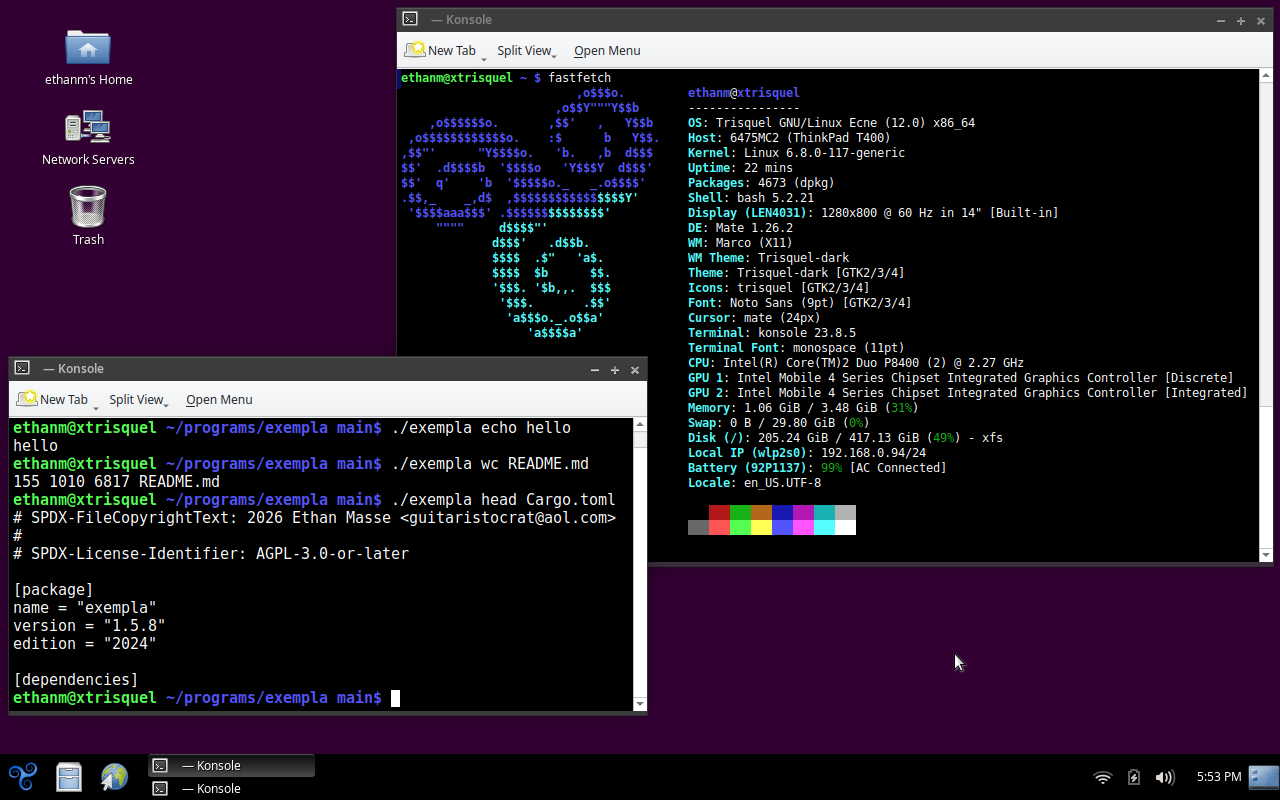
After taking my T400 off the shelf about a few weeks ago just to get it updated (I like to have all my systems relatively up to date so they can continue to receive updates without manual intervention), I saw that Trisquel wanted to update to version 12. During the update process, of course since the battery was bad, the power cable momentarily lost connection and the computer shut off, toasting my installation completely. So, I bought myself a new aftermarket battery from China for the T400 and then I put the latest Trisquel 12.0 on my Free Software Foundation membership card, and installed it and paved over the drive. This time, I took the extra time to legitimately learn how to use a Librebooted system and what all the different functionalities were (which before just kind of confused me whenever I tried to boot anything on it), and Trisquel 12 is working pretty good. I was very confused for awhile about how to effectively boot, and now I understand: you generally can boot anything like normal BIOS or UEFI just by using SeaBIOS, the payload included in the firmware. However, sometimes for some reason when booting off a USB the BIOS can lead you to a black screen, where typing "live" activates the correct boot option most of the time to get it working. How you're supposed to know that or where that's said anywhere, I really don't know. But now I know I just have to boot SeaBIOS from the GRUB menu in the firmware and try that as my first attempt to boot anything.
I enjoy using Trisquel 12. It's using MATE, which I really like. It's pretty relaxing and the way I use it it honestly gives me a similar vibe to how KDE looks and feels, but it's really responsive on this old machine. I could have installed Triskel instead, which is Trisquel using KDE, but I thought that might kill this poor old 2008 ThinkPad, so I haven't even tried that. As far as anyone's concerned, the 3d acceleration on this laptop is practically nonexistent, and MATE apparently can run without any 3d graphics acceleration required at all.
I have in the past recommended MATE through various channels as a great desktop environment to use, though lately I haven't been using it just because I've been trying to distance myself from X11 software as much as possible. I don't know anything about X11's code quality as I haven't personally looked at it, but what I can say as a user of the software is that a lot of programs to do basic things on X11 are legacy software that feels like it's a miracle even still work, and software is just prone to breaking or crashing or not displaying fonts correctly or not scaling correctly or screentearing... I just don't particularly like the legacy X11 stuff anymore. In fact, a lot of issues I've had with Linux systems in the past that I couldn't figure out I've since realized are just issues with X11 and not actually something fixable by anyone. Suffice it to say, going from using exclusively Wayland for years back to an X11 system is kind of a system shock.
But overall, the software support on Trisquel is better than ever. Most of the things I've installed have just worked (besides some terminal emulators, but that's because of my graphics drivers), and I can surf the web and use my desktop and stuff with only 4Gb of RAM, which is pretty impressive. It also has ungoogled-chromium available in the apt repositories, and Kiwix the offline wiki reader in the default repositories as well, both of which I use all the time.
I've now switched over for the foreseeable future to using this Trisquel 12.0 computer as my main carry-around laptop, and we'll see how it works out in the future. I can say that everything that I actually output (basically this website and my Rust projects) all work just fine on this machine. I imagine the packages won't update a whole lot though in the near future, and might border on being legacy nearing the end of Trisquel 12's lifecycle, but that's something we'll have to wait and see how it pans out. Honestly I was surprised Trisquel even put together a whole new release, and considering that the quality is outstanding. Definitely the best of the completely free operating systems (by FSF standards) that I've experienced. Maybe I'll have to give Parabola another shot soon and see if that's improved since I used it as well.
That's all for today. Hope you all have a great weekend.
June 5, 2026. Updated June 12, 2026.